




I did a quick Google search and found you can prevent Javascript from resizing your window. Thing is, this will only prevent resizing of your current window, not new windows. So then I dug some more and found a way to stop the new window from opening at all. Both of these are browser settings, so there's no need for a plugin. So here's how to do both changes:
Prevent resizing current window
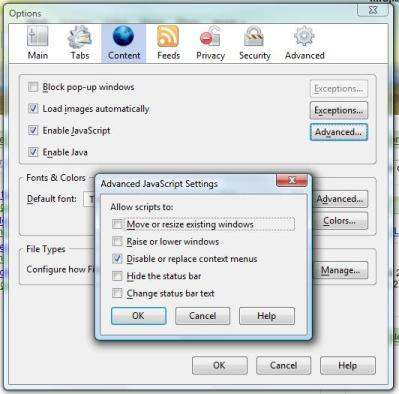
Click on Tools->Options. Click on the Content section, and then click the "Advanced..." button next to "Enable Javascript." Then, uncheck the first box to disable resizing as shown below.
Prevent opening in new window (force to open in new tab)
With this method you can still open a new window by right clicking a link if you want. But it won't allow a new window to be opened when you don't want to, like when clicking on the comments section of a blog. Instead, it will open in the same window in a new tab, and the window will remain the same size.
Type "about:config" into the address bar without the quotes and hit enter. In the Filter box, type "newwindow" without quotes or spaces. The interesting values are the ones for browser.link.open_newwindow and browser.link.open_newwindow.restriction. The browser.link.open_newwindow tells Firefox to open links in new tabs if it's 3, new windows if it's 2, or the current tab/window if it's 1. The browser.link.open_newwindow.restriction is a bit different. If it's 2, it says to follow browser.link.open_newwindow unless the new window specifies how it should be displayed. In my case it was set to this by default. Setting it to 1 will make it allow Javascript to open new windows. And setting it to 0 will force it to follow browser.link.open_newwindow settings. You right-click and select Modify to change the default values.
So I set browser.link.open_newwindow.restriction to 0 and left browser.link.open_newwindow at 3, and it worked like I wanted. Everything opens in new tabs, and my window doesn't ever get resized. I can still open things in new windows if I want via right-clicks, but I prefer always using tabs.


Posted by: junosand on May 6th, 2007 | 2:57pm